




Recently, I found myself solving a problem that I suspect many business owners, payroll admins, and advisers will instantly recognise.
One of my clients exports a timesheet report from WorkflowMax every single week. Before they can upload it into Smartly Payroll, they have to open the file in Excel and do exactly the same set of manual steps every time:
- Move columns around
- Rename headings
- Delete what Smartly doesn’t need
- Make sure the file still matches Smartly’s strict import format
It’s dull, repetitive, time‑consuming — and because it’s manual, it always carries a risk of errors.
Here’s what exports from WorkflowMax as a CSV file:

So I decided to fix it properly.
What’s interesting about this story isn’t just the solution, but how I built it — because I genuinely could not have done this without AI.
Two Solutions
I ended up building two different solutions to the same timesheet transformation problem.
Both achieve the same outcome:
Take a CSV exported from WorkflowMax and turn it into a file Smartly Payroll will happily import.
But the way they work and the user experience are very different.
Solution 1: Excel + Power Query (with Copilot’s Help)
For the first approach, I stayed inside a familiar tool: Excel.
I built a small transformation tool using Power Query. The idea was simple:
- The user drops in the raw WorkflowMax export
- Power Query does the transformation
- The output is in the exact format Smartly Payroll needs
I had never used Power Query before so I relied heavily on Copilot to get this working:
- Copilot helped me design the steps
- It generated the Power Query (M) code
- It explained what the code was doing so I could understand it
- When things didn’t work, it helped troubleshoot and refine the logic
Below is a short clip showing this first process in action:
I also have a screenshot of a portion of the Power Query code. This is a great example of where Copilot really shined — it helped me generate code confidently enough to paste straight into Power Query and then adjust as needed.
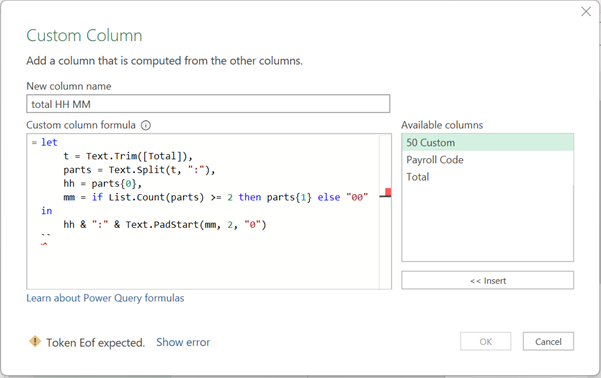
Pros and cons of this approach
This approach lives entirely inside Excel, is very robust once set up, and does not require any third-party tools.
It works, but it’s a bit fiddly for users. Power Query can get confusing if you need to make tweaks, so I started thinking there must be a way to make the whole thing feel smoother.
Solution 2: A Cleaner Workflow Using Lutra
For the second approach, I used Lutra as this solution focuses entirely on user experience:
The user is prompted to upload the CSV, clicks a button to initiate the transformation, and once the process runs, the output file is ready.
Here’s a short clip showing this second workflow:
For a non‑technical user, this is noticeably cleaner and easier to live with.
But it does need a clear prompt – here’s what I used and what I’m getting better at – this one only took me 2 attempts to get right.
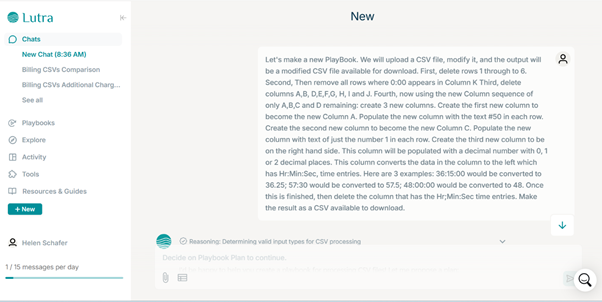
And it was clear enough for lutra to turn that into a series of steps:
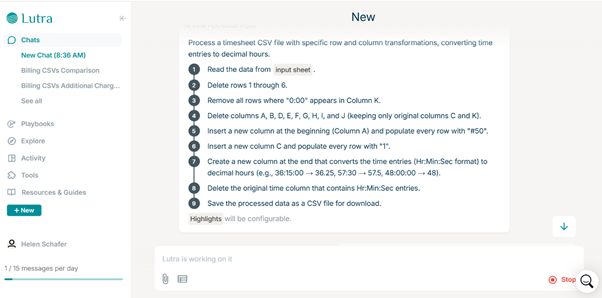
And then to write the code to do it;
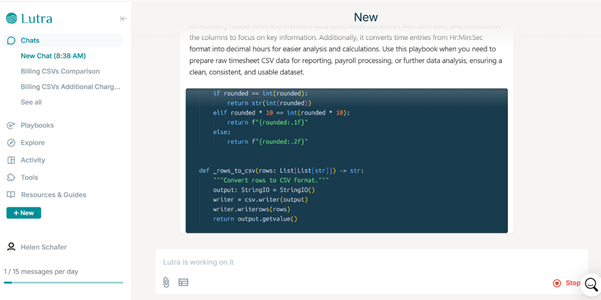
The Process Doesn’t Use AI — But I Did
Just to be clear, the data transformation itself doesn’t use AI at all. It’s rules‑based logic.
But I absolutely needed AI to get it to work.
This wasn’t achieved through a single prompt, it depended on several things.
First, it required effective and precise prompting. The process also involved repeated iterations, continually refining the approach.
Developing this combination of skills is, for me, the true area of growth.
Why This Matters (Beyond This One Client)
AI didn’t magically fix anything but it did make it possible for me to build solutions I simply couldn’t have achieved before — at least not without weeks of learning, trial, and frustration.
And this is where I see the real opportunity:
- Automating the boring, error‑prone tasks
- Freeing people up for higher‑value work
- Creating tools that are actually usable by real humans
There are now many ways to solve the same problem, with a growing number of tools available. Knowing which tool to use, when, and how to combine them thoughtfully is increasingly the differentiator.
If you’re dealing with repetitive manual processes like this — payroll, reporting, data cleanup — it’s worth stepping back and asking:
“Is this something I should still be doing by hand?”
Chances are, the answer is no.
If you’d like to see how this kind of approach could work in your own business, or you’re curious about practical AI + automation use cases (not hype), feel free to get in touch.