




This topic is often confusing across all payroll systems because terms such as Annual Leave, Holiday Pay, Accrued Leave, and Earned Leave can have different meanings depending on the payroll system. In this blog we are referring to Xero Payroll only and the two terms used are Annual Leave and Holiday Pay.
Annual Leave
In New Zealand employees are entitled to four weeks annual leave every year. The first annual leave is accrued at the 12 month anniversary date so prior to that date, the employee does not have any annual leave. Then, 4 weeks annual leave is accrued again every 12 months after that first anniversary date.
with Xero Payroll NZ’s upgrade (since sept 2024) Annual Leave balances now show as weeks as well as the equivalent in hours. Those hours are taken from the standard hours showing in the employee's Employment Tab.
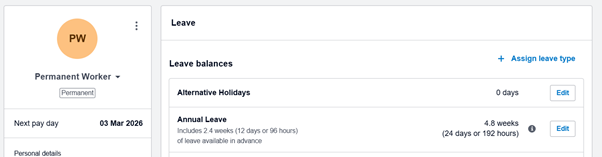
You can see a complete record of what has accrued and what has been taken by running a Leave Transactions Report, and this is a source of truth. On this report you can see every transaction that has happened so it’s a good place to spot potential errors. E.g. a strange opening balance, accruals that are changing in different years, or strange payout amounts. Here’s what it looks like. Strangely it doesn’t have a column with a running balance but you can export to XL and just add that.

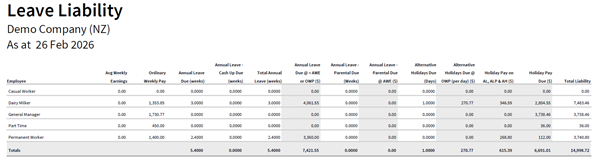
In Xero Payroll there is also Annual Leave in Advance, which is when Annual Leave is paid out, even when there isn’t a positive balance of Annual Leave accrued. This can happen with leave is paid out before the 12 month mark, or later on if all Annual Leave accrued has already been paid out. It is not necessary a problem as long as the value of the Annual Leave in advance being paid out is not greater than the value of what would be paid out in a final pay. You can see this on the Leave Liability Report – the overall balance in the final column should always be positive.
For example you might have a situation where the “Annual Leave due @ > AWE or OWP” (7th column from the left) is a negative number, but this is balanced out by a “Holiday Pay Due” balance that is higher (2nd column from the right), bringing the “Total Liability” (far right column) back into the positive.
Total Liability should always be positive because if employment suddenly ends and Total Liability is negative, the employee will be owing money to pay back to the employer.
HOT TIP: If your employees work flexible hours, then the “Annual Leave due @ > AWE or OWP” may not be accurate because it does not include the OWP calculation of 4 week average. Sometimes that makes a big difference.
Holiday Pay
In Xero Payroll Holiday Pay accounts for the first year before Annual Leave accrues at 12 months, and the partial year since the last accrual. It shows in Xero Payroll as 8% of gross earnings $ value. (there might be exceptions to this 8% but that’s the norm). Holiday Pay only builds up until it’s replaced by Annual Leave at the next anniversary date – it returns back to zero when the next Annual Leave is accrued.
You can also see a complete record of Holiday Pay by running a Leave Transactions Report, and this is also a source of truth. You will see the Holiday Building up, and on the anniversary date you will see a reversal. In this example, you can see the balance going back to 0, and then in the same week showing as $112 as the Holiday Pay earned that week.
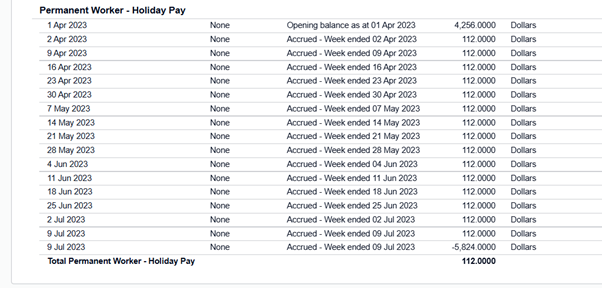
HOT TOP: Potential errors can happen from incorrect or missing opening balances, as well as error reversals that don’t bring the balance back to zero. But easy enough fixed as the correct Holiday Pay balance is always the 8% of gross earnings since the last anniversary date, and anything prior can be ignored.
The 2025 Xero Payroll Upgrade – Have you done it?
In Sept 2024 Xero released an upgrade to NZ Xero Payroll. This upgrade includes some great new features such as finally being able to set an Annual Leave anniversary date that is not the same as an employee start date. The main difference is the upgraded version keeps Annual Leave entitlements in Weeks instead of only hours and this is going to reduce errors that happened a lot with the previous version. Errors happened because often a manual adjustment to Annual Leave balances was needed when Standard Hours changed in the Employment Tab.
However, still in Feb 2026 I am seeing most clients running their own payroll have not made the switch to the new version. So how can you tell?
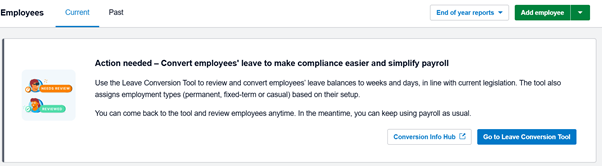
Check the Payroll / Employees dashboard – If you see a message (as below) inviting you to into the Conversion Tool it means you’ll still on the old version.
What does the conversion tool do?
Using the conversion tool will update your current Annual Leave balances into Weeks (from hours) based on the hours showing in the employees Employment Tab. If needed it will also ask you for additional information to clarify the status of the employee and how leave will accrue in future.
The upgrade lowered the risk of errors by providing clearer guidance on employee setup and status.
The conversion tool does NOT fix any previous errors that might be in the file. However, if you suspect there are previous errors this should not stop you from upgrading to the new version. Errors can be addressed at any time and balances recalculated and adjusted as required.
For the conversion tool to work you may be asked to clarify work status if existing records show anomalies between the leave set up, and the standard working hours.
Why doesn’t Holiday Pay $ always convert into Annual Leave Weeks?
A Holiday Pay value is a dollar value and it’s never open to interpretation
However, the $ value of an employees Annual Leave can only be determined at the time the leave is being taken. This is a part of the current Holidays Act in NZ that has caused perhaps the most issues.
Here’s an example. An employee works full time and also works extra paid hours every week for the first 12 months of employment. After 12 months the extra hours go away and they only work 40 hours.
At the 18 month point, the employee will have the 4 weeks Annual Leave + Holiday Pay of 8% of gross earnings since the Annual Leave accrual.
If the employee asks how much Annual Leave they have, it might be easy to answer “the equivalent of 6 weeks”. But the value of that 6 weeks is not the same as 6 weeks normal pay. Due to the extra hours worked, the employees average weekly earnings AWE over 52 weeks will be higher than their standard earnings and that affects how much is paid out when Annual Leave is taken. Every week, the amount that would be paid out can change, because every week the 52 week average will change.
Why is both Annual Leave and Holiday Pay due when employment ends?
After 12 months there will be an Annual Leave balance, and a Holiday Pay balance. When employment ends both are paid out. If the Annual Leave balance is in the negative due to Annual Leave in advance being paid out, then the value of what has been paid out in advance will be offset against the value of the Holiday Pay.
If you have more questions about Xero Payroll, get in touch with Helen at Living Business.