


You may have seen that Xero is starting to automatically enable e‑invoicing unless you opt out.
At a high level, this is a positive step. But like many good technology changes, the real impact isn’t the feature itself, it’s the process changes around it.
This is where most businesses will either benefit or potentially get caught out.
What changes with e‑invoicing?
Traditionally, an accounts payable process might look something like this:
- Supplier emails invoice
- Someone monitors the inbox
- Invoice gets saved, forwarded, or printed
- Data is entered and sent for approval
With e‑invoicing, that changes fundamentally.
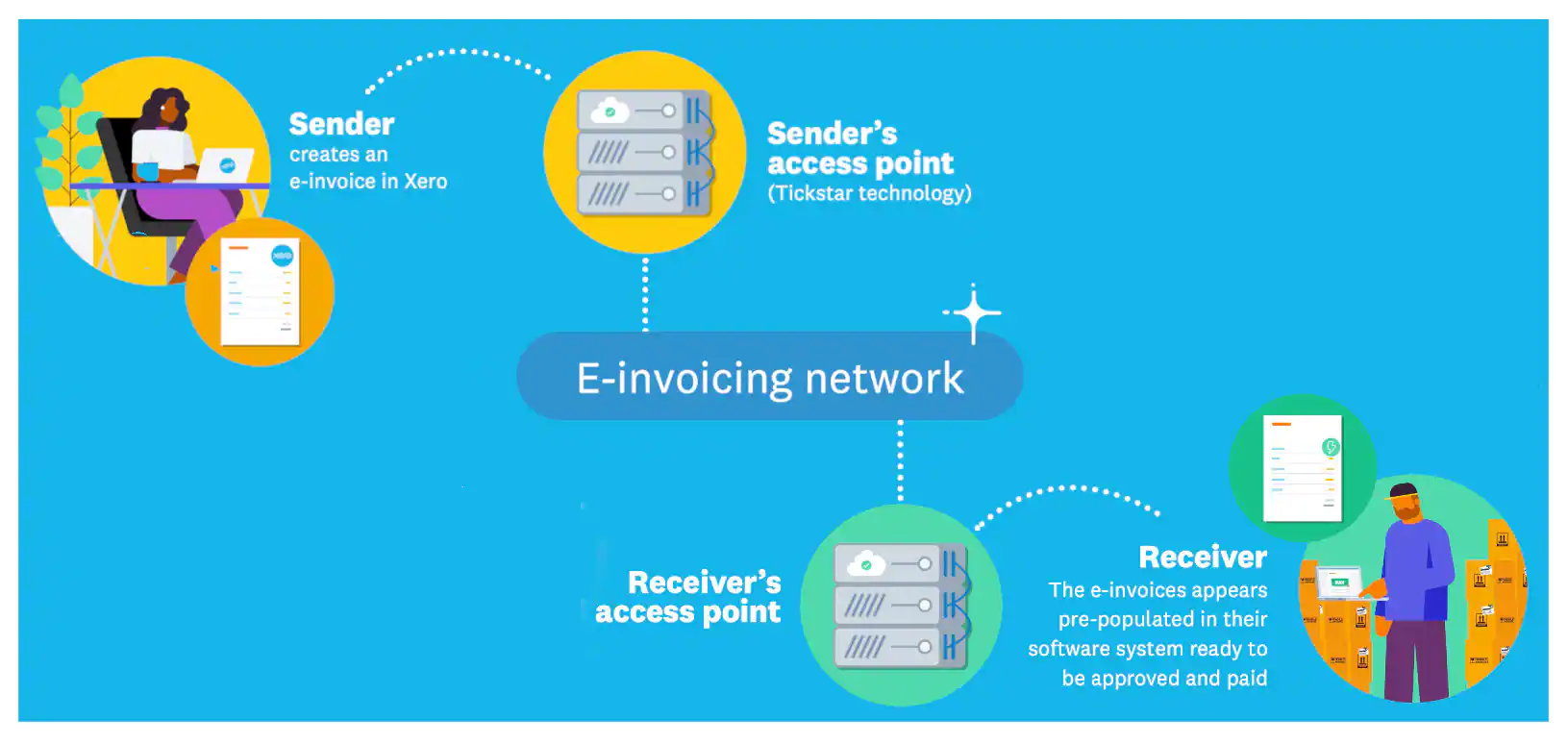
Invoices are sent directly between accounting systems using a secure network, and can appear in Xero automatically as draft bills.
There’s no email, no PDF attachment, and often no manual entry required.
That’s powerful — but it also means:
- No inbox to monitor
- No “forwarding” step
- No natural pause before entry into the system
The invoice simply arrives.
The process risks to be aware of
Most issues I’m seeing are procedural rather than technical.
“Out of sight” invoices - If your team relies on email as the trigger to process invoices, those invoices may simply not be picked up.
Broken approval workflows - Invoices may appear in Xero before anyone has reviewed them, which can disrupt approval processes if they’re not clearly defined.
Duplicate processing - You may still receive PDFs by email as well as e‑invoices directly into Xero so without clear rules, you risk entering the same invoice twice.
Unclear ownership - If there is no inbox it needs to be explicit who is responsible for checking incoming bills.
The process shift challenge
The businesses that transition well tend to do these things:
Move from email-based to system-based workflows - Instead of monitoring an inbox, the process becomes: Automatic email forwarding of bills into Xero, Check Xero, Review draft bills, Approve through a defined workflow
Clarify responsibilities - Someone needs to own Reviewing incoming e‑invoices, Coding and approvals and Monitoring for duplicates
Review controls - E‑invoicing can accelerate the process so your controls need to keep up with appropriate Approval thresholds, clear separation of duties and consistent coding rules
The opportunity
If you approach this intentionally, e‑invoicing isn’t just a process change, it’s a genuine efficiency gain and improvement to security.
Faster, cleaner workflows - Invoices arrive ready to process, reducing manual data entry and handling.
Fewer errors - Structured data removes many of the mistakes that come with manual entry or incomplete readings through scanner technology
Improved security – Invoices are sent through a secure network rather than email, which reduces the risk of interception, fraud, or tampering in transit.
Better visibility - Invoices are captured in real time, giving a clearer view of liabilities and cash flow.
Time back for higher-value work - Automation shifts effort away from admin and towards review, analysis, and decision-making.
If you’d prefer not to use e‑invoicing
If e‑invoicing isn’t right for your business at this stage, you can opt out from the subscriber email in Xero before the 5 June deadline.
Want help reviewing your process?
If you’re unsure how this will affect your current setup, or you’d like to use this as an opportunity to streamline your processes, I’m very happy to help.
You can get in touch or book a time with me to talk through your current workflow and make sure everything is set up in a way that works for your business.